Introduction
EGN Android Extractor is up-to-date, effective, and minimalistic software for Android technicians, IT personnel, and GSM service providers that are looking for an efficient and reliable solution used to extract crucial data files from Android gadgets. By employing the EGN Android Extractor application, you can get system partitions, extract files of firmware components, extract boot and recovery images, recover data from locked or crashed devices, etc.—in other words, everything. This version has recently been in vogue among smartphone owners and repair experts due to its fast operations, precise results, and vast compatibility with numerous chipsets and versions of the Android platform. With that application at hand, mobile repair shops and others will successfully tackle their jobs, thanks to the opportunity to work with the advanced tool that is a must in the software toolkit of technicians specializing in mobile devices.
Description
EGN Android Extractor is an innovative software solution used exclusively for Windows, performing extraction of diverse data from Android gadgets. It deals with just several boot methods named ADB, Fastboot, Recovery Mode, and even Firmware packages as a matter of fact. Utilizing it, the technicians can read system files, such as boot. img, recovery. img, system. img, vendor. img, and other system partitions in a highly simplified manner.
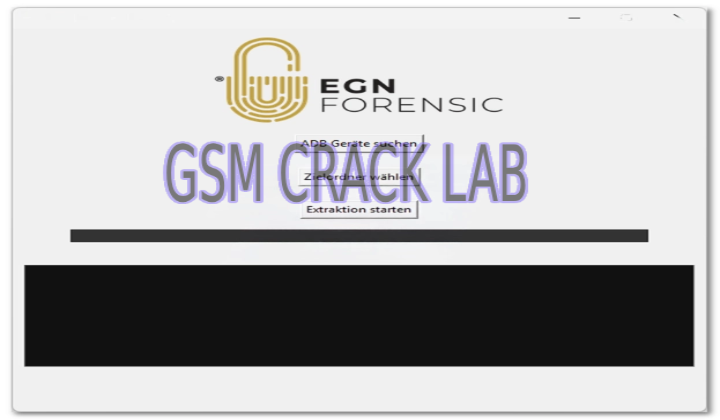
Specialists come across situations wherein the technology manages the overall OS system, fabric, model-specific system files, or helps recover devices in case of a booting problem. EGN Android Extractor is something of a beginner’s dream. With a very clean interface that allows the novice user to operate it comfortably, this tool can be handled by anyone without having to use complex commands.
What the EGN Android Extractor does is it reads and processes files from an extensive list of device and firmware formats, such as TWRP, CMW, ADB, and Qualcomm, as well as MTK scatter files, QFIL, and EMMC raw binary. As a result, the app is able to connect to almost every prominent phone brand.
EGN Android Extractor is also loaded with advanced tasks that require full actions from the users, including partition browsing, file previewing, and quick file extraction. The implementation receives the compressed firmware files and the image encryption (in some devices), and it supports them. First of all, the tool is light and handy; this means it does not require high computer resources, and it works even on old computers pretty well.
Thus, EGN Android Extractor was created to streamline complicated output operations for mobile developers, firmware hackers, and professional technicians seeking hassle-free and quickly reproducible outcomes.
Key Features of the EGN Android Extractor
1. Multi-Firmware Support
Extracting the most common Android firmware is possible through:
MTK Scatter firmware
Qualcomm NAND/UFS firmware (QFIL)
Samsung TAR/IMG packages
OPPO/Réaume OZIP
Xiaomi Fastboot ROMs
Android Generic IMG files
2. Extract Important Partitions
Be able to deal with the following important partitions:
boot.img
recovery. img
system. img
vendor. img
vb meta. img
user data. img
3. ADB & Fastboot Support
Permit data extraction from mounted devices directly while ensuring the necessary USB drivers for ADB or Fastboot mode.
4. Partition Browser
It acts as an inbuilt feature, allowing little or no time delay between partition browsing and previewing before extraction.
5. Encrypted Firmware Support
Processing encrypted archives with its built-in decryption (unfixing) function is part of the good functionalities.
6. Recover Data from Damaged Devices
When somebody is up against a situation of difficulty booting or having corrupt firmware, he can use this option to extract data.
7. Lightweight & Fast Performance
Just sit simply and work on your low-end PC—straining the CPU hardly—it runs very smoothly.
8. Clean & Simple Interface
The best part of it is its interface is optimized for beginners, and it has easy-to-understand command buttons, and the navigation is very intuitive.
9. Automatic Updates
You will be obliviously informed when that Android version’s support stuff is updated.
10. Free to Use
EGN Android Extractor is free software and can be downloaded, making it an ideal choice for professionals and beginners.
How to Install the EGN Android Extractor
Step 1: Download the Setup File
Step 2: Disable Antivirus (Optional)
Occasionally, third-party software may provide false information; just mute the antivirus software prior to the EGN Android Extractor installation process.
Step 3: Extract the ZIP File
The mechanism for extracting this file can be downloaded and installed via software called WinRAR or 7-Zip.
Step 4: Run the Installer
Open the EGN_Extractor_Setup.exe file and choose ‘Run as Administrator.’
Step 5: Install USB Drivers
This process would include:
ADB drivers
Fastboot drivers
MediaTek drivers
Qualcomm drivers
These memory locations are required to be programmed, and the tool reads them correctly.
Step 6: Launch the Software
Run the tool that you shall have installed either as an icon on your desktop or as a file existing in a directory.
Step 7: Connect Your Device or Firmware
You can merely:
Attach a phone in the ADB (Android Debug Bridge) / Fastboot USB mode, or
Select the firmware files manually
Step 8: Start Extraction
Now you need to pick the partition or piece of firmware you would like the program to extract and click Start.
Download Link: HERE
Your File Password: 123
File Version & Size: |
File type: compressed / Zip & RAR (Use 7zip or WINRAR to unzip File)
Support OS: All Windows (32-64 bit)
Virus Status: 100% Safe Scanned By Avast Antivirus