Introduction
Fast Unlocker Pro V1.2.3.3 is a feature-rich professional security tool for Android smartphones, which is perfect for any GSM technician, mobile repair shop, and power user who is interested in getting the job done rapidly and successfully. The V1.2.3.3 release updates top-up success chances, introduces new Android version retention, and makes the technical endpoint tool a more reliable choice for the tool’s daily use.
Description
As far as the functions are concerned, it is used extensively for the elimination of FRP and screen lock opening, resetting to factory condition, and providing primary system repairs for many Android cell phone manufacturing companies.
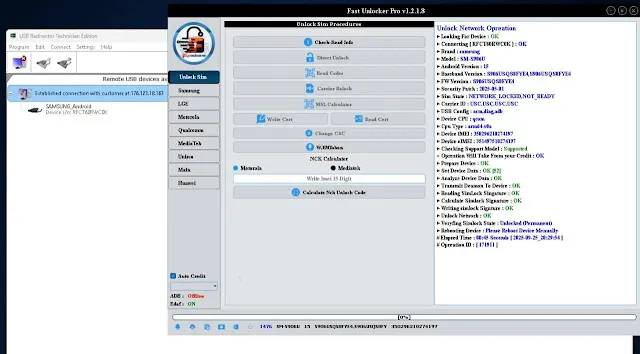
Key Features of Fast Unlocker Pro V1.2.3.3
✔ FRP Lock Removal
Bypass FRP on the supported Android.
✔ Screen Lock Unlocking
Full-PIN, pattern, and password removal (no need to flash full firmware for it; model-dependent).
✔ ADB & Fastboot Support
Executes basic systemic commands—allows you to reboot, reset, and obtain device information, amongst others.
✔ Automatic Device Detection
Auto-scans the model of the device, its working status, and supported operations after connection.
✔ Soft Brick Repair
Restarts faulty devices in a better condition.
✔ Fast & Stable Performance
Redefined processes to lessen time and guarantee zero glitches of every instruction and an easier journey.
✔ Real-Time Operation Logs
The software generates carefully labeled logs, making progress tracking and error identification easier.
How to Install Fast Unlocker Pro V1.2.3.3
Step 1: Download the Tool
Step 2: Extract the Package
Use the WinRAR software or the 7-Zip application to extract the downloaded ZIP or RAR file.
Step 3: Install Required Drivers
ADB & Fastboot Drivers
Samsung USB Driver
Qualcomm USB Driver
MTK USB VCOM Driver
Step 4: Run the Tool
Open the folder where Fast Unlocker Pro was downloaded and run Fast Unlocker Pro.exe as an administrator.
Step 5: Connect the Device
Link your computer to it via a USB cable.
Step 6: Select the Operation
Click on the name of a specific function that you want to perform.
Step 7: Start the Process
After the reboot of the device, it will do it on its own.
Download Link: HERE
Your File Password: 123
File Version & Size: | 233.62 B || V1.2.3.3 |
File type: compressed / Zip & RAR (Use 7zip or WINRAR to unzip File)
Support OS: All Windows (32-64 bit)
Virus Status: 100% Safe Scanned By Avast Antivirus