Infinity CM2SP3 Latest Version Free Download ( 2026 )
Infinity CM2SP3

Introduction
Infinity CM2SP3 is an Infinity Team product that is considered one of the best accessories for mobile servicing. Infinity Team is a well-known and accomplished organization.
Description
Infinity CM2SP3 is a professional mobile hardware tool that uses the Infinity Box or USB Dongle as the main accessory.
Infinity CM2SP3 boasts and has a great edge on this software tool’s safety without compromising this edge.
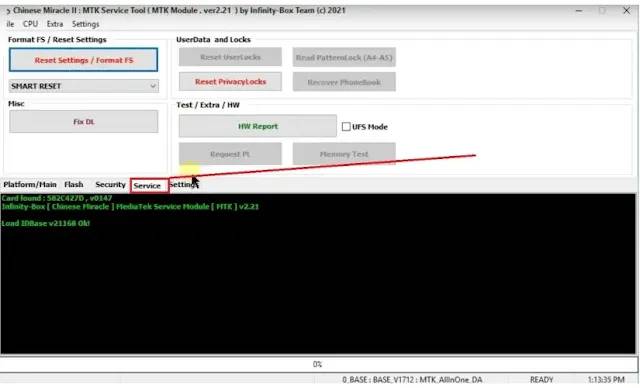
Key Features of Infinity CM2SP3
✔ UniSoc / Spreadtrum Chipset Support
✔ FRP Lock Removal
The supported models can be done safely; you’ll remove Google account verification, or FRP, using this tool.
✔ Screen Lock Unlocking
Screen lock is the way to reset PIN, pattern, and password without having to use full ROM flashing (device varies).
✔ Firmware Flashing & Repair
To fix boot loops and other system software issues, users can flash the stock operating system with Odin.
✔ Dead Boot Repair
The gamut of servicing items is formed, including, for instance, FRP removal, user lock unlocking, stock firmware flashing, boot rep, and corrupted software repair.
✔ Hardware-Based Security
The authentication of the access is performed by the official Infinity Box or USB dongle.
✔ Automatic Device Detection
It will detect the model, CPU type, and the corresponding boot mode automatically.
✔ Wide Brand Compatibility
Wide brand compatibility with Samsung (SPRD), Nokia, Tecno, Itel, Infinix, Lava, Micromax, and many more geographic-based brands will be beneficial.
How to Install Infinity CM2SP3
Step 1:
Step 2: Install the required drivers
Installing the drivers on your Windows PC:
Infinity Box/Dongle Drivers
Spreadtrum/UniSoc USB Drivers
ADB & Fastboot Drivers
Step 3: Connect the Infinity hardware
When these words are written, you must connect the Infinity Box or USB dongle to your computer to make sure that it has been properly detected by the system.
Step 4: Run the CM2SP3 module
Open the Infinity software suite and run the CM2PS3 module as an administrator.
Step 5: Login & activation
After the installation of the software, log in with your Infinity account or input your dongle-related info in order to activate the software on your PC.
Step 6: Connect the device
To reboot the power, which is off right now, use the USB connection that the smartphone has to have been put when it is in the required service mode.
Step 7: Select model and operation
Identify the appropriate brand and model, along with your required service option, which could be FRP Remove, Unlock, or Flash.
Step 8:
Launch and Finish the Process
Download Link: HERE
Your File Password: 123
File Version & Size: | 24.97 MB || V2.47 |
File type: compressed / Zip & RAR (Use 7zip or WINRAR to unzip File)
Support OS: All Windows (32-64 bit)
Virus Status: 100% Safe Scanned By Avast Antivirus