Introduction
MDM Tool v1.0.9.4 is now available for download on your workstation. This innovative tool is specifically created for technicians, mobile repair stores, and general service providers. Dealing with MDM, KG lock, and device restrictions can be challenging if you do not have the right tools.
Description
MDM Tool v1.0.9.4 is a dedicated application for Windows to remove and repair MDM barriers. Among Android phones, in particular those owned by the corporate world or schools, there are MDM profiles that secure the phones from unexpected data leaks; this also locks the essential features of the devices, such as factory reset, USB debugging, app access, and the settings. This kind of restriction may block the owners of second-hand devices and affect technicians who seek service repairs.
The software also provides automatic recognition of the connected devices’ USB modes at the same time, thus speeding up the process and making manual configurations unnecessary.
The tool boasts a friendly interface, which is user-friendly to the extent that it allows non-technicians to find their way around the options through it. The most well-known use of the tool is to eliminate and escape the KG Lock, remove all Knox-related restrictions, and various other MDM policies that create blockages for everyday use of the devices. The program does not need any special drivers other than the installed ones—link the device with the PC, choose the function, press the button, and perform the action in one click.
Its user-friendly interface, smart MDM algorithms, and wide capacity of device support make it one of the crucial tools for Android MDM bypass in 2025.
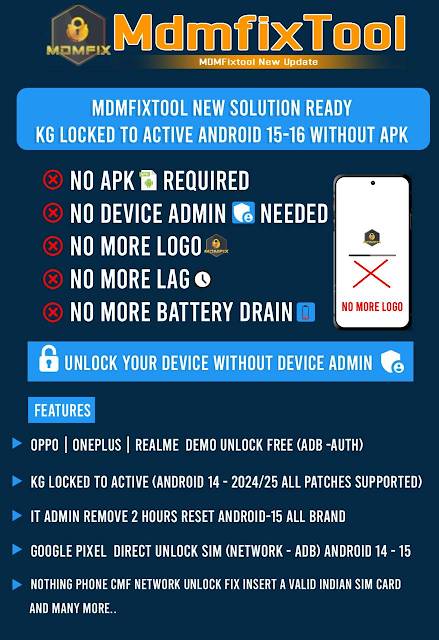
Key Features of MDM Tool v1.0.9.4
1. Support other brands and security versions (as instant MDM bypass function)
This tool dominates the market with its powerful instant MDM bypass feature that supports multiple Android brands and security levels.
2. Remove KG/Knox Guard Restrictions
The ‘KG Locked’ must be fixed in this instance, and the ‘Knox Guard’ keystones that prevent device activation or access should be unlocked.
3. ADB & Fastboot Mode Support
Works seamlessly with ADB-enabled devices and deals with basic operations in Fastboot operation.
4. Improved Device Auto-Detection
Transported in an automatic device detection process, it doesn’t require the need to configure a port.
5. Supports the Latest Android Versions
Updated to match up with the previous versions of firmware and security patches released in the years 2024 and 2025.
6. Reset/Disable Security Policies
Remove ‘restricting’ MDM policies, i.e., policies to avoid apps, USB debugging, Wi-Fi, Bluetooth, or factory reset.
7. Lightweight and Fast
The software runs without flaws on any PC with Windows, thereby minimizing the usage of system resources and thus ensuring the stability of overall operation.
8. One-Click Operations
A single click for most operations—users who are unfamiliar with the tool or a new GSM technician could easily arrive at a solution.
9. No Credits / No Login Required
You can take it for free and not worry about the monthly fee, credit-based use, or online authentication.
How to Install MDM Fix Tool v1.0.9.4
Step 1: The Download (Obtaining the Tool)
Step 2: Unzip the zip file
Unzip the file using 7Zip or WinRAR and save the files into a new folder that you create on your desktop.
Step 3: Go for the Drivers, If Required
Samsung or a universal USB driver will be enough in this situation.
Step 4: Run the Doing program as the administrator
On the executable file “MDM Tool.exe,” then click on run it as the administrator.
Step 5: Get Going with Your Device
Anyone can use either Recovery Mode (if available) or Normal Mode.
Step 6: Select the Work to Do
Purposefully select MDM Bypass, KG Fix, or any of the other interventions based on the case at hand.
Step 7: Launch the Tool
The solution is getting processed automatically by the software; consequently, the device should not be unplugged unless this phase is completed.
Step 8: Reboot and Check
To move the needle with the weapon once it achieves the mission, the phone needs to be rebooted first, and the operation needs to be validated as succeeding in removing the MDM restriction.
Download Link: HERE
Your File Password: 123
File Version & Size: | 116.52 MB || v1.0.9.4 |
File type: compressed / Zip & RAR (Use 7zip or WINRAR to unzip File)
Support OS: All Windows (32-64 bit)
Virus Status: 100% Safe Scanned By Avast Antivirus