Mysterious-Dev Tool V1.0.3 Latest Version Download
Mysterious-Dev Tool

Introduction
Mysterious-Dev Tool V1.0.3 is recent and versatile Android servicing and development software suitable for GSM engineers, professional developers, and proficient mobile repair users. In this V1.0.3 release, Mysterious-Dev Tool provides smoother and leaner security, works compatibly with the latest Android patch, and upgrades the device communication protocol.
Description
Mysterious-Dev Tool V1.0.3 can be a Windows-based, Android-oriented repair tool used for a wide set of phone operations.
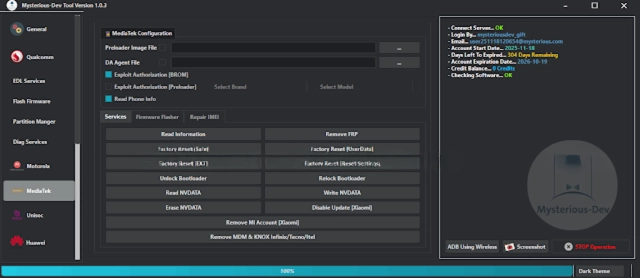
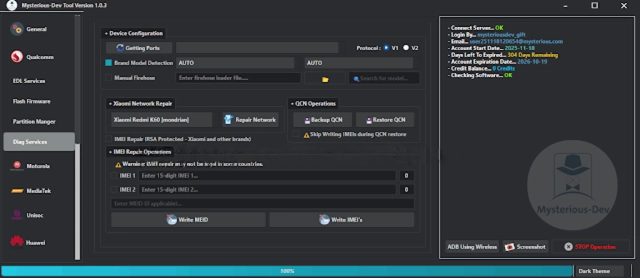
A functional tool interface supports operating modes that include ADB, Fastboot, EDL (9008), and Preloader.
The end version 1.0.3 has been presented with additional user reliance on the system, falling over more advanced Android versions. It has a lean framework that keeps necessary memory stress low for even those low-spec Windows PCs, which could be beneficial for repair shops or freelance technicians.
Key Features of Mysterious-Dev Tool V1.0.3
✔ FRP & Account Handling
Allows The Google account proved operations on compliant devices.
✔ Screen Lock Utilities
Manage and delete ICON, model line, and password lock as allowed by the device model.
✔ Multi-Chipset Support
Fully works with Qualcomm, MediaTek, Exynos, SPD, and UniSoc devices.
✔ ADB & Fastboot Tools
This one ensures overall selling by including alternative options, hardware commands, and system controlling.
✔ EDL & Preloader Mode Support
For Qualcomm and MTK devices, this one could offer more capabilities by going to the more advanced operations.
✔ Firmware & System Repair Support
To cope with the loop, breakdown, or the bricks and mortar of memory and software.
✔ Auto Device Detection
It will automatically associate devices on the chipset and mode basis and show the available program classes to save time and disoperation.
✔ Real-Time Logs
Real-time checks to view and stay updated with the smooth loading of the user log.
✔ Lightweight & Fast Performance
The program doesn’t hang or face any interruption of execution of commands at all.
✔ User-Friendly Interface
The linear and understandable design suits beginners and experienced users.
How to Install the Mysterious-Dev Tool V1.0.3
Step 1—Download the Tool
Step 2—Extract the Archive
Step 3—Install USB Drivers
1. Qualcomm HS-USB deluder
2. MTK USB VCOM / Preloader
3. Samsung USB Driver
4. ADB & Fastboot Drivers.
Step 4—Run the Tool
Open the folder that resulted from extracting the archive and run Mysterious-detail.exe using the “Run As Administrator” option by right-clicking.
Step 5—Connect the Device
Connect the device in ADB mode, or in Fastboot, EDL, or Preloader mode.
Step 6—Select Operation
You need to choose a function to get the device into the desired mode.
Step 7—Start the Process
Once the work is finished, the device will restart on its own.
Download Link: HERE
Your File Password: 123
File Version & Size: | 234.13 MB || V1.0.3 |
File type: compressed / Zip & RAR (Use 7zip or WINRAR to unzip File)
Support OS: All Windows (32-64 bit)
Virus Status: 100% Safe Scanned By Avast Antivirus