Introduction
In the modern mobile servicing industry, security unlocking and key generation tools have become essential for professional technicians. HMT Smart Keys Generator v2.01 is a powerful and lightweight utility designed to generate smart keys for supported mobile servicing operations. With improved algorithms, enhanced compatibility, and optimized performance, this latest version delivers reliable and fast results for GSM professionals.
If you are searching for the HMT Smart Keys Generator v2.01 latest setup download, the HMT keygen tool, or smart key generation software for mobile repair, this detailed guide will explain everything, including features, the installation process, and system requirements.
This tool is especially useful for technicians who regularly work with unlocking, firmware activation, and secure access operations.
Overview of HMT Smart Keys Generator v2.01
HMT Smart Keys Generator v2.01 is an advanced utility developed to simplify smart key generation tasks required during mobile servicing procedures. The tool offers a user-friendly interface combined with optimized backend processing for secure and fast key generation.
The latest v2.01 update focuses on:
-
Improved key generation algorithms
-
Enhanced stability and performance
-
Better compatibility with updated servicing modules
-
Bug fixes from previous versions
Unlike older key generators that required complex configurations, HMT Smart Keys Generator v2.01 works with simplified input fields and automated processing. This makes it ideal for both beginner technicians and experienced GSM engineers.
The tool has gained popularity among mobile repair professionals because of its efficiency and minimal system resource usage.
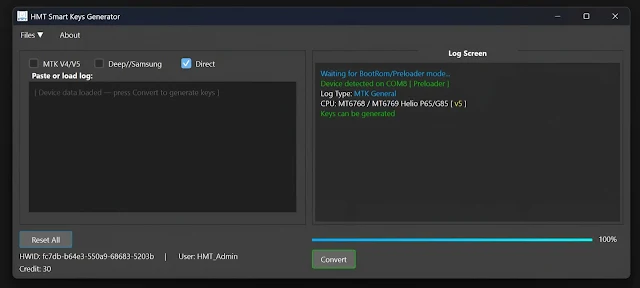
Description
HMT Smart Keys Generator v2.01 is designed to generate secure smart keys that are required for various supported mobile servicing operations. These keys are used during authorized repair procedures, unlocking processes, or activation tasks depending on supported modules.
The software works by processing device-related information and generating secure authentication keys through advanced internal algorithms. The updated version ensures:
-
Accurate key generation
-
Reduced processing time
-
Secure handling of input data
-
Improved compatibility with modern Windows systems
One of the biggest advantages of the HMT Smart Keys Generator is its lightweight nature. It does not consume heavy RAM or CPU resources, making it suitable even for low-spec service laptops commonly used in repair shops.
Additionally, the interface is clean and simple, reducing the chances of user errors during key creation.
Key Features of HMT Smart Keys Generator v2.01
Below are the main features of the latest version:
1. Advanced Smart Key Generation
-
Fast and accurate key creation
-
Improved encryption logic
-
Secure authentication processing
2. Updated Algorithm Engine
-
Enhanced security bypass compatibility
-
Better stability compared to older versions
-
Optimized processing speed
3. User-Friendly Interface
-
Clean and simple dashboard
-
Easy input fields
-
One-click key generation
4. Lightweight & Fast
-
Minimal CPU usage
-
Low RAM consumption
-
Quick launch time
5. Improved Compatibility
-
Works smoothly on Windows 7, 8, 10, and 11
-
Compatible with 32-bit and 64-bit systems
-
Supports updated servicing modules
6. Stability Improvements
-
Fixed bugs from previous release
-
Reduced crash issues
-
Enhanced overall performance
These features make HMT Smart Keys Generator v2.01 a reliable choice for professional GSM technicians.
How To Install HMT Smart Keys Generator v2.01
Follow these steps carefully to install the tool correctly:
Step 1: Download the Tool
Download the HMT Smart Keys Generator v2.01 setup file from your trusted GSM source.
Step 2: Extract the Files
-
Right-click the downloaded file
-
Choose “Extract Here” using WinRAR or 7-Zip
-
Open the extracted folder
Step 3: Disable Antivirus (If Required)
Sometimes antivirus programs may block key generation tools. Temporarily disable antivirus protection during installation if necessary.
Step 4: Run Setup
-
Double-click the setup file
-
Select “Run as Administrator.”
-
Follow on-screen instructions
Step 5: Complete Installation
-
Finish installation process
-
Launch the tool from desktop shortcut
Step 6: Start Using the Tool
Open the software, enter the required information, and generate smart keys easily.
Note: Always use the tool responsibly and for professional servicing purposes only.
Download Link: HERE
Your File Password: 123
File Version & Size: | 45.81 MB || V2.01 |
File type: compressed / Zip & RAR (Use 7zip or WINRAR to unzip File)
Support OS: All Windows (32-64 bit)
Virus Status: 100% Safe Scanned By Avast Antivirus