Kleister and PDT Platform Detector V1.0.7 Free Download No Dongle Required
Kleister and PDT Platform Detector V1.0.7

Introduction
Kleister and PDT Platform Detector V1.0.7 are advanced mobile servicing utilities designed to help GSM technicians accurately detect device platforms, chipsets, and security configurations before performing repair operations. In the mobile repair industry, proper device identification is crucial for safe flashing, unlocking, and firmware repair. Using the wrong loader or firmware can permanently damage a smartphone. That’s where Kleister and PDT Platform Detector V1.0.7 become essential tools.
This latest version introduces improved detection algorithms, expanded chipset support, and better compatibility with modern Android security patches. Whether you are working with Qualcomm, MediaTek, or other popular smartphone platforms, this tool provides accurate technical information that helps reduce repair risks and increase success rates.
If you are searching for a reliable platform detection tool for Android devices, Kleister and PDT Platform Detector V1.0.7 are must-have additions to your professional toolkit.
Overview
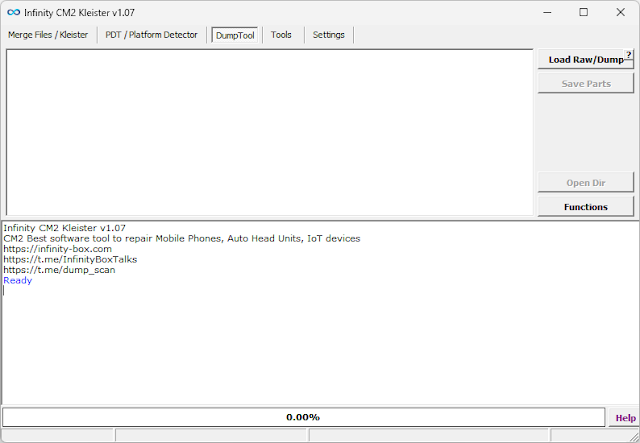
Kleister and PDT Platform Detector V1.0.7 are Windows-based diagnostic and detection software built specifically for mobile repair technicians. The primary function of this tool is to detect smartphone hardware platforms, chipset types, boot configurations, and security statuses before executing complex operations like flashing, FRP removal, or unlocking.
Unlike standard flashing tools, this platform detector focuses on identifying:
-
Device chipset (Qualcomm, MediaTek, Unisoc, etc.)
-
Boot mode status (ADB, Fastboot, EDL, BROM)
-
Security patch level
-
Bootloader lock state
-
Authentication requirements
Version 1.0.7 enhances detection speed and supports newer Android devices released in recent updates. With its lightweight interface and accurate reporting system, the tool helps technicians avoid costly mistakes.
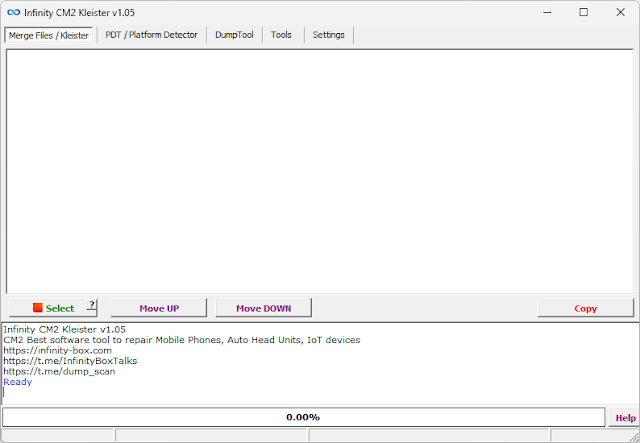
Description
Kleister and PDT Platform Detector V1.0.7 is designed to simplify pre-repair diagnostics. Before flashing firmware or performing unlocking operations, technicians must confirm the exact hardware configuration of a device. Incorrect identification can result in flashing failure or device bricking.
This tool automatically scans the connected device and generates detailed information about its platform and security environment. It works across multiple connection modes, including
-
ADB Mode
-
Fastboot Mode
-
EDL Mode (Qualcomm)
-
BROM Mode (MediaTek)
The updated V1.0.7 version improves compatibility with newer chipsets and security updates introduced in the latest Android versions. It provides structured logs and organized device details, making it easier to select the correct firmware or servicing method.
Another major advantage is its lightweight design. The software runs smoothly on most Windows systems without consuming heavy resources, making it ideal for repair shops handling multiple devices daily.
Key Features:
Here are the core features of Kleister and PDT Platform Detector V1.0.7:
1. Automatic Platform Detection
Quickly identifies the chipset type, including Qualcomm, MediaTek, and other supported platforms.
2. Boot Mode Recognition
Detects whether the device is connected in ADB, Fastboot, EDL, or BROM mode.
3. Security Patch Information
Displays Android security patch levels for accurate compatibility checks.
4. Bootloader Status Check
Shows whether the device bootloader is locked or unlocked.
5. Authentication Requirement Detection
Identifies if a device requires special authorization or loader authentication.
6. Detailed Log Reporting
Provides structured logs for professional troubleshooting and documentation.
7. Wide Device Compatibility
Supports multiple Android brands and models.
8. Lightweight & Fast Performance
Minimal system resource usage with fast detection speed.
9. User-Friendly Interface
Simple dashboard layout suitable for both beginners and experts.
10. Regular Updates
Improved compatibility with newly released Android devices.
How To Install Kleister and PDT Platform Detector V1.0.7
Follow these steps to install the tool properly:
Step 1: Download the Tool
Download Kleister and PDT Platform Detector V1.0.7 from a trusted or official source.
Step 2: Extract the Files
If the file is in ZIP or RAR format, extract it using WinRAR or 7-Zip.
Step 3: Install Required Drivers
Ensure that USB drivers for Qualcomm, MediaTek, and ADB are installed on your computer.
Step 4: Disable Antivirus (If Necessary)
Some servicing tools may be flagged as false positives.
Step 5: Run as Administrator
Right-click the executable file and select “Run as Administrator.”
Step 6: Complete Setup
If an installer is included, follow the on-screen instructions to finish installation.
Step 7: Restart PC
Restart your computer to ensure drivers function correctly.
Step 8: Connect Device
Connect the smartphone in the required mode (ADB, Fastboot, EDL, or BROM).
Step 9: Start Detection
Launch the tool and allow it to scan the connected device.
Once detection is complete, review the device information before proceeding with flashing or unlocking.
Download Link: HERE
Your File Password: 123
File Version & Size: | 17.83 || 1.0.7 |
File type: compressed / Zip & RAR (Use 7zip or WINRAR to unzip File)
Support OS: All Windows (32-64 bit)
Virus Status: 100% Safe Scanned By Avast Antivirus