Introduction
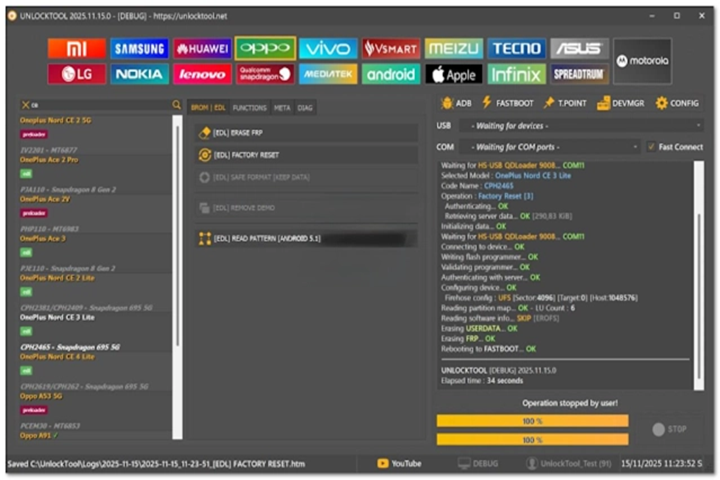
Unlock Tool 2025.11.15.0 is the result of adding complex coding that is a fully updated and enhanced version of the best mobile service applications for people who are GSM professionals, shop owners, or technicians. Renowned for its speed, which yields an astonishing number of devices and is regularly updated, Unlock Tool allows you to operate and fix a phone incredibly quickly and efficiently. This update features complex chip compatibility, better connection stability, and new options that are unique to Samsung, Xiaomi, Vivo, Oppo, Realme, Huawei, and many others.
Description
Major modes are ADB mode, Fastboot mode, Recovery mode, EDL mode, Brom mode, Meta mode, and Download-Side mode support that are suitable for every piece of firmware or security repair.
It incorporates higher FRP bypass algorithm strength, stable Samsung and MediaTek chip compatibility, MTP function emulations for theoretical new Samsung devices, more stable Xiaomi authorless operations, and improved lessons on how to unlock device bootloaders.
Features as unique as the Xiaomi Auth Bypass and Samsung FRP MTP, as well as the function of relock fix for Vivo/OPPO, EDL mode, and direct bypass of MediaTek devices, make it a top-level tool among other GSM tools. The interface is contemporary and uncomplicated, assisting professionals as well as beginners.
Instead of the 2025.11.15.0 release, it comes equipped with an even better system of pinpointing the exact location of the device/device series, extremely useful diagnostic capabilities, and improved flash capabilities. It is a cloud-based application that guarantees quick security patches as well as a user-friendly platform.
Key Features of Unlock Tool 2025.11.15.0
Advanced FRP Removal
For Samsung, Xiaomi, Vivo, Oppo, Realme, Tecno, Infinis, Huawei, and many more. The more recent revision resolves issues associated with Android 13/14/15-based FRP bypass.
Xiaomi Auth Bypass
No need for authentication! There is no-authority fast boot flashing, an FRP biotic patch, a reboot function, boot repair, and re-laster fixes for most Xiaomi devices. This model works like the “Mi Unlock Tool” and “Mi Flash Tool” combined into one—without using specific paid authorization.
Samsung Special Operations
MTP FRP bypass
ADB Enable
Factory reset (one-click)
KG Locked Handling
UFS Auto-Detect Operation
MediaTek Enhancements
Brom mode exemplify
META mode reinforcing
AUTH bypass
Read/write firmware full support
Qualcomm EDL Functions
The updated EDL loader functions for reading device info, resetting FRP, fixing partition issues, flashing firmware, and solving boot problems are bundled with it.
Bootloader Unlock/Relock
The advance assists secure unlock algorithms support for a significant number of cell phone brands.
Pattern/PIN/Password Remove
The model has been developed so that it can remove lock screen conditions without loading up or data clear required on specific phones.
Fast boot & ADB Tools
Offers selection along these lines: restart, root functions, driver installation, device description, APK installer, debugging tools.
Smooth UI & Faster Processing
In the new version, improvements have been made to performance, stability, and quick job completion.
Daily Updates & Online Activation
Dongle is not required – the cloud licensing system guards against trouble with constant and quick activation.
How to Install Unlock Tool 2025.11.15.0
Step 1: Reach the website
Step 2: Turn off your antivirus temporarily so that there are no interferences during installation.
Roll back Microsoft Security Essentials or whatever third-party detector that might block your installation temporarily.
Step 3: Extract the executable downloaded compression file.
You just unzip the files using Windar or 7-Zip.
Step 4: Deploy the software you have downloaded.
Click UnblockTool_Setup.exe and select “Run as administrator” from the list that pops up.
Step 5: Before proceeding further, add drivers to your system. This message will appear when you connect your computer to your phone for the first time.
– ADB Drivers
– Fast boot Drivers
– MediaTek Drivers
– Qualcomm Drivers
– Samsung Drivers
To get the software to recognize the device correctly, it is important to do this.
Step 6: Get started with Unlock Tool right from your desktop by clicking on it.
Open the Unlock Tool from your shortcut you set on the desk.
Step 7: Authorize your account and log in with your regular username.
Step 8: Set sail on a voyage by offering to help.
Join the device, select the service you are willing to provide (remove FRP, flash, unlock, etc.) and initiate the service.
Download Link: HERE
Your File Password: 123
File Version & Size: | 396.82MB | | 2025.11.15.0 |
File type: compressed / Zip & RAR (Use 7zip or WINRAR to unzip File)
Support OS: All Windows (32-64 bit)
Virus Status: 100% Safe Scanned By Avast Antivirus