Sigma Plus Tool v1.01.05 Free Download
Sigma Plus Tool

Introduction
Sigma Plus Tool v1.01.05 is the most recent and technologically advanced breakthrough to the Sigma mobile system, which has been specially developed to cater for the repair and service of mobile devices for professional technicians and repair specialists on GSM networks. With its powerful unlocking capability, fast service, and abundant brand compatibility, Sigma Plus stands out as one of the favorite tools in the world of GSM service.
This supporting role makes it the right option for mobile experts who are looking for a fast and only tool of this kind. As a technician working with Android smartphones, Sigma Plus Tool v1.01.05 should exist in your workshop.
Description
Originally positioned as Sigma Key, Sigma Plus is the advanced tool with a revamped UI, widespread protocols, and novel features to augment its functionality.
The solution provides multiple parameters, like updated software configuration settings optimized for the 2024-2025 (predicted) Critical Telecom Cyber Requirements, and is one of the best commercial applications in the GSM area on the market.
The tool offers immediate functions, secure flashing, partition backup, repair patterns for advanced cases, and detailed guidance regarding these modes.
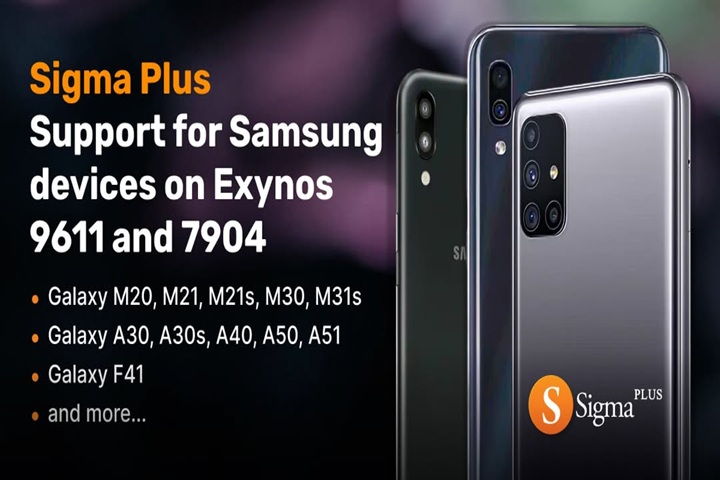
Key Features of Sigma Plus Tool v1.01.05
1. FRP Unlock / Google Account Removal
Compatible with various Android preserves digits from major manufacturers.
Newly updated security bypass algorithm for the 2024-2025 updates.
2. SIM Unlock / Network Unlock
Enables an operator to unlock some Motorola, Alcatel, ZTE, and Huawei models.
Includes options for both versions of security.
The carrier unlock is great support for this.
3. IMEI Repair (For Supported Chipsets)
IMEI restoration features for support of MTK and Qualcomm phones are available.
Precise and record-saving features.
4. Firmware Flashing
It is possible to read and write firmware files with MTK, Qualcomm, and other types of CPUs.
Support of scatter, XML, and PAC formats based on device configurations is assured.
Added stability in our flashing system to stop boot loops and soft bricks.
5. Boot Repair & Recovery
Recovery mode fixed stages that seemed like a loop; the higher you get, the closer you are to falling back to where you started.
Devices recovered after wrong firmware flashing.
EDL (9008) mode allows phones with Qualcomm chipsets only to get into emergency download mode.
6. Diagnostic Mode (DIAG) Access
Used for allowing complex diagnostics on Qualcomm-specified models.
Save and transfer the serialized QCN file set in this mode.
7. Huawei Improved Functions
New feature of Huawei ID retrieval.
Increased performance for Kirin.
FRP and bootloader serve new models at a miraculous pace.
8. Motorola Special Functions
The lucky ones would also get the option of unblocking their bootloader, but only if they own some particular models.
They propose a flash custom service firmware feature.
Full protection of your smartphone and keeping it available 24/7.
9. Backup & Restore Tools
Ensure that key topics, such as the files like NVRAM, EFS, QCN, and a few others, are actively backed up and stored.
10. Clean and Modern Interface
User clearance of options such as FRP, Flash, Unlock, and Repair with clear functionality tabs.
Easy-to-use UI design for better adoption and quick functionality for users.
How to Install Sigma Plus Tool v1.01.05
Go through these points with caution to establish how to become a Sigma technician on a Windows-based PC.
Step 1: Download Sigma Plus Tool v1.01.05
Make sure that the ZIP file is not corrupted.
Step 2: Disable Windows Defender/antivirus
For this reason, almost all the security tools on the market report it as a sham.
Temporarily disable all real-time shields and get the installation done.
Step 3: Extract the ZIP File
The ZIP file contained within the link must be extracted using software like WinRAR or 7-Zip.
This tool gives you the path to that file and drivers.
Step 4: Run the Installer
In the right-click (select context menu), you have to select “SigmaPlus.exe.”
In this step, you may need to run the file as an administrator.
Step 5: Install Required Drivers
Create a folder labeled ‘Drivers’ on your computer.
Install all drivers from the “Drivers” folder included in the package.
Step 6: Launch the Tool
The tool can be opened by clicking on the desktop symbol or the one installed during the initial launch.
The new feature will start scanning, and it will run quietly.
Step 7: Connect Your Device
Whilst using the Sigma tool, there are different modes where you can connect your device as, for instance,
1. ADB Mode
2. Fastboot Mode
3. META Mode (MTK)
4. EDL Mode (9008 for Qualcomm)
5. Download Mode
Try to use a USB cable of superior quality.
Step 8. Perform Your Desired Operation
The decision could be between:
FRP Remove
Unlock
IMEI Fix
Flashing
Recovering your lost data
Download Link: HERE
Your File Password: 123
File Version & Size: | 73.12 MB || v1.01.05 |
File type: compressed / Zip & RAR (Use 7zip or WINRAR to unzip File)
Support OS: All Windows (32-64 bit)
Virus Status: 100% Safe Scanned By Avast Antivirus