VG Tool V4.1 Update With Keygen Free Download
VG Tool

Introduction
At mobile repair facilities, the technologies evolve swiftly, and the workers there need the use of fast, reliable, and lightweight Android toolkits to manage all the system issues of the mentioned phones. Further, VG Tool V4.1 is among the most recent multifunctional tools created, its main purpose being to handle FRP removal, reflashing, unlocking, and other diagnostic problems associated with most chipset platforms. It is well-liked by the technical community because of its speed, accuracy, and user-friendly interface; this tool is becoming prevalent in the daily working environment of MediaTek, Qualcomm, Spreadtrum, and other great brands.
Through the improved detection feature, wider support of models, and efficient repair functionalities, VG Tool V4.1 allows smartphone repair workers to address problems that require more than a simple tool. Whether you struggle with boot loops, factory reset protection locks, software corruption, or other IMEI-related topics, this release—upgraded and modern—gives acceleration to the performance but still keeps the gruesomeness of the situation outside the inevitable limit.
Description
VG Tool V4.1 is an Android-focused tool that works on Windows systems to handle the high-level repair tasks. In terms of chipset support, it works with the basic chipsets like MTK, Qualcomm, and SPD, and for some versions of Samsung, only the standard fast boot/ADB functions. Built for everyday usage in the shop, it not only provides engineers with the capability to pass FRP, conduct factory resetting, and flash firmwares, but also restore the partitions, take IMEI-related measures, provide diagnostic operations, and many others.
Unlike many programs, VG Tool V4.1 is a resource-economical tool, which has a low possibility of lagging on any high-low system. Moreover, for one to achieve a fast process here, the processing is evident here, and the function of self—the tool—also includes an increased device recognition engine, which preserves steady transmission between the PC and device, rather than preventing the incidents of disconnection during flashing or repair operation.
The brand-new V4.1 update will come with additional phone models so that the process is even more secure and quicker for Android 12 and 13 devices, optimized FRP algorithms, and increased speed of read/write for the partitions. Irrespective of whether you are a pro or an apprentice in the mobile repair field, the tool presents a user interface with the most common options at your fingertips.
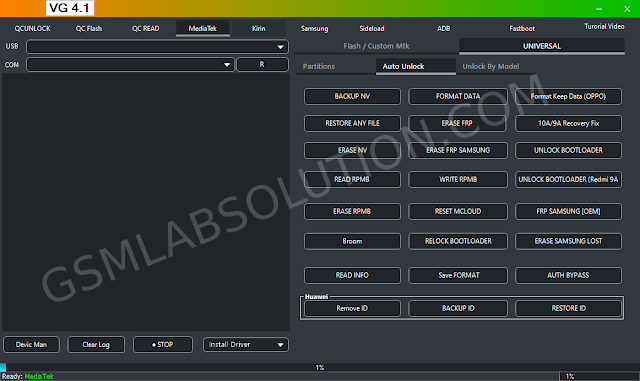
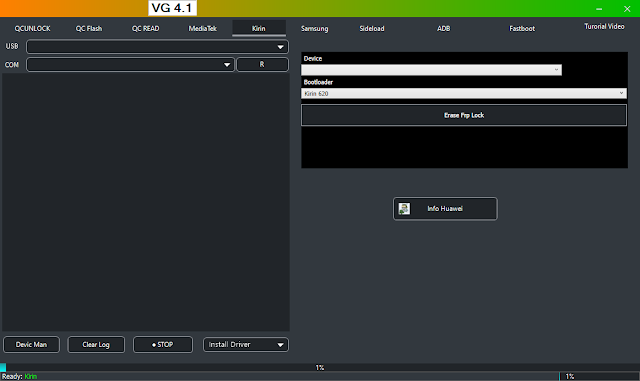
Key Features of VG Tool V4.1
FRP Bypass for All Major Brands
Do one-tap:
Samsung
Xiaomi
Vivo
OPPO
Réaume
Tecno / Infinix
MTK / Qualcomm / SPD devices
Show improved algorithms that operate on the most recently developed Android versions.
Factory Reset/Wipe v2
For this purpose, the tool is equipped with:
Factory reset without data
Complete wipe
Formatting is secure, even for corrupt devices
Ideal for dealing with boot loops and password-locked phones.
Flash Firmware (MTK, Qualcomm, SPD)
All firmware flashing is accomplished by VG Tool V4.1.
Full firmware flashing
Partition flashing
Custom image flashing (boot, recovery, system, vbmeta, etc.)
Perfect for getting bricked devices resuscitated or for software corruption.
Boot & Partition Repair
Recover crucial partitions:
Boot
Recovery
System
Vendor
User data
For the slightest compensation of your device.
Advanced Qualcomm Features
Explore the following options that can be activated:
EDL Mode
Read & Write QCN
IMEI repair (reliably)
Security backup & restore
MediaTek DAA/SLA Bypass
Allows access to MTK devices with secure boot, which is an utmost concern when flashing and formatting become your priorities.
Device Info & Logs
Disseminates detailed device status to a user, including chip make, OS version, patch distribution, and the state of the bootloader.
Facilitates the quick fixing of the mobile phone blocking.
Simple & Clean Interface
The elegant makeover of the design just takes your breath away. The tool features are displayed on the screen, and thus even novice users start to learn how to use them and then fall in love with it.
How to Install VG Tool V4.1
Continue by installing the tool:
Step 1: Obtain Version 4.1 of the VG Tool
Download it from a verified source like GSM Crack Guru or the official release site of the tool.
Step 2: Unzipped Folder
Extract into a folder by right-clicking on the downloaded file → Extract Here or Extract to Folder.
Step 3: USB Driver Configuration
The needed scripts include
MTK USB drivers
Qualcomm USB drivers
SPD scripts
ADB/fastboot scripts
Most drivers come in one package.
Step 4: Run the Driver Installer
Invoke the VGTool.exe file with administrator privileges.
Step 5: Connection
Ensure a proper connection by connecting through:
ADB mode
fast boot mode
Download mode (MTK/SPD)
EDL mode (Qualcomm)
Step 6: You are the point man
Choose such as Delete FRP, Flash, Format, or Partition Repair, and hit Start.
Step 7: First it takes time, but then success is guaranteed
The tool will carry out the selected operation and display successful logs, and so the whole procedure will be complete.
Download Link: HERE
Your File Password: 123
File Version & Size: | 528.03 MB || V4.1 |
File type: compressed/zip & RAR (use 7zip or WINRAR to unzip the file).
Support OS: All Windows (32-64 Bit)
Virus Status: 100% Safe Scanned By Avast Antivirus