ADB ToolsFlashing ToolsQualcomm ToolUnlocking Tools

Android Multi Tool v1.3.3.9 Released (Free Auth)

Android Multi Tool

DOWNLOAD NOW

Introduction

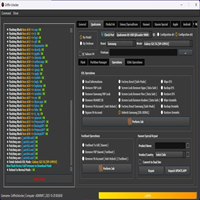
Android Multi Tool v1.3.3.9 is minimalist, fast-processing, and effective software for Android users, mobile technicians, and GSM shop owners looking for a reliable, multipurpose utility to assist with device resetting, unlocking, testing, and management. This build, v1.3.3.9, has been improved in a manner akin to feature enhancement, detection, and increased compatibility with newer Android smartphones.

Description

Android Multi Tool v1.3.3.9 is a desktop solution for ADB (Android Debug Bridge) and Fastboot modes to maintain and repair gadgets in an Android-based manner. The application provides a plethora of functionalities, including the possibility of recovering forgotten lock patterns, removing supported PIN/password locks, and disabling FRP (Factory Reset Protection) with older devices. The application is especially helpful for devices that are stuck in boot loops or when login attempts are unreliable, thereby forcing the user to forfeit their credentials.

Hedjaz (1, 2, 3, etc.) allows users to conduct a string of operations in an instant.

The module works smoothly without stressing the system, which has minimal hardware driver requirements to provide an excellent user experience.

In all, Android Multi Tool v1.3.3.9 is an essential tool for every technician who seeks a consistent, quick, and user-friendly program to operate.

Key Features of Android Multi Tool v1.3.3.9

1. Eliminate Patterns, Pins, and Passwords

Erase different types of locks on specified phones without using cumbersome re-partitioning.

2. FRP Bypass (Older Version of Android)

It bypasses the Google account verification lock of more traditional devices that relied on ADB reset methods for the procedure.

3. Reading Device Information

Information retrieval (IMEI, model version, Android system version, other hardware/software details).

4. Reset Face/Gesture Login

This useful function can help unlock the devices on which the gesture or face recognition codes are in use.

5. Android Commands (ADB Operation Tools)

Reboot device

Restart ADB server

Install APKs

Read log cat

Enable USB debugging on selected supported models

6. Fastboot Mode Features

Provide the option to unlock the bootloader

Flash partitions

Reboot to recovery or system

7. Wipe Data & Cache

Quick resolution of boot loop issues or unknown sluggish device performance by wiping excess data.

8. Hardware Prioritization

Consolidate vibration, touchscreen, and display tests on particular Androids.

9. Simple Keyboard-Based Interface

Never dip into endless lists—guiding number keys is the way the number of tasks will be completed quickly.

10. Free (Light in Size and No Usage of Heavy Files)

No requirement of applying the burden of heavy files or payment of the subscription charges. It runs without any operational issues on (even) outdated Windows OS versions.

How to Install Android Multi Tool v1.3.3.9

Step 1: Download the Tool

Download the most recent version of the Android Multi Tool v1.3.3.9 ZIP file.

Step 2: Antivirus (But Not All)

Some software you may download may be deemed false positives.

Step 3: Unzip the File

Unzip the folder that you have downloaded with WinRAR or 7-Zip to your desktop folder or other preferred destination.

Step 4: Provision of Drivers for ADB & Fastboot Installation

Make sure to install the drivers for ADB and Fastboot if you are seeking to interact with your Android gadget.

Step 5: Begin Using Android Multi Tool

Go to the folder and double-click Android_Multi_Tool.exe or the BAT file (version does not matter whatsoever).

Step 6: Link Your Android Device

Get your phone connected to the computer through the USB cable and ensure that:

The debug mode on your phone is on.

Admiration of ADB authorization has been executed.

Providing Fastboot mode was deemed essential.

Download Link: HERE
Your File Password: 123
File Version & Size: | v1.3.3.9 | | 47.19 MB |
File type: compressed / Zip & RAR (Use 7zip or WINRAR to unzip File)
Support OS: All Windows (32-64 bit)
Virus Status: 100% Safe Scanned By Avast Antivirus

DOWNLOAD NOW

Related Articles

Leave a Reply

Your email address will not be published. Required fields are marked *

Back to top button