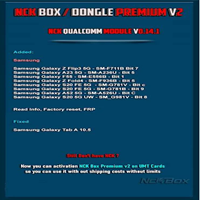
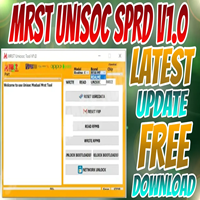
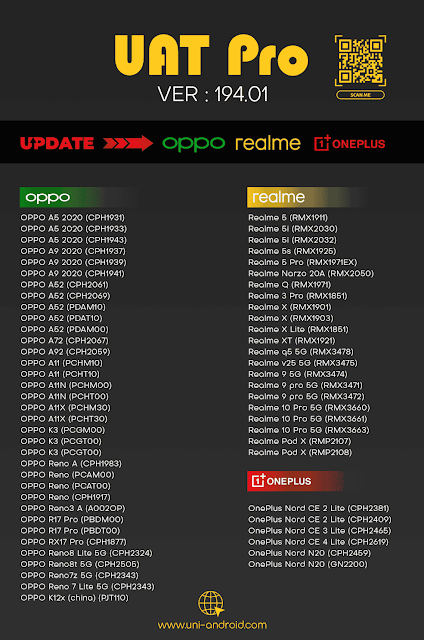
UAT PRO V194.01 Samsung, TCL, ZTE , Oppo, Realme Update
UAT PRO

Introduction
UAT PRO V194.01 represents the latest and most refined version of the UAT (Ultimate Advanced Tool). This application is based on Android. It is meant for repairs, flashing, unlocking, and mobile phone servicing.
Description
UAT PRO V194.01 Windows is an application that offers deep-level repairs and unlocking for Android devices.
V194.01 institutes the chipset optimization and colloquial features of the devices. It gives a longer list of devices, and one of them is the phones with the MediaTek (MTK), Qualcomm, SPD (Unisoc), and Exynos processors.
What sets UAT PRO apart from others is the accuracy of its detection feature, which helps in the automatic trawl of the device after the chip, the model, the boot order, and the communication state.
To ensure efficient and fail-safe procedures with this advance in technology, the design has been made user-friendly.
Key Feature of UAT PRO V194.01
1. Advanced FRP Bypass Support
These security patches will support new FRP unlock methods for stable/better results.
2. Multi-Chipset Support (MTK/Qualcomm/SPD/Exynos)
MediaTek, Qualcomm EDL, Unisoc, and Exynos ocean gaze servicing under the same interface.
3. Flashing and Firmware Installation
Covered are scatter firmware flashing—using MTK Management Tool, fast boot flashing, EDL flashing including required firehose quick, and customized partition flushing.
4. IMEI Repair (Legal Use Only)
Apart from modifying/writing the repair IMEI file from the database, a backup and restore can be a database.
5. Boot Repair / Dead Boot Fix
Also, sink in case there are so many; not only is it essential to repair the frizzy device but also to restore it back to its original state; thus, the option of booting is a very smart way to go.
6. ADB/Fastboot Tools
Another feature in the UAT PRO V194.01 tool includes: reading device lists, app management, wipe options, mode changing boot status, unlock action, and custom tool function.
7. Samsung Special Functions
Really loaded this tool with quite a number of special functions, with some of them being factory reset, KG function, KG fix, MTP FRP bypass, and the removal of screen lock. Other tools include CSC write.
8. Xiaomi Fastboot & Recovery Functions
Includes operations on Xiaomi device selected chipsets, i.e., flashing and bypass functions—can run without any authorized account.
9. Oppo/Vivo Features
No need to be afraid of bricking it.
10. Secure & Fast Execution
The present update utilizes an improved engine, which properly executes commands with high accuracy and which also reduces the chances of making errors on your device.
11. User-Friendly Interface
Clearly, the modern UI system with distinct menus is designed to be easily navigated by pros and beginners alike.
How to Install UAT PRO V194.01
Step 1: Download UAT PRO V194.01
Step 2: Extract the Package
All the files are being extracted into a new folder with the help of the Windar or 7Zip tool.
Step 3: Install Drivers
These include MTK USB drivers, Qualcomm USB drivers, SPD/Unisoc USB drivers, and Samsung ADB/MTP drivers.
Step 4: Install UAT PRO Setup
On the installation page, click “OK” to proceed with the installation process.
Step 5: Connect Your Dongle/Box
UAT PRO features the hardware (dongle/box). Dock the hardware to the USB port in this scenario.
Step 6: Launch the Tool
Right-click user_manual_v1.0.pdf → Open.
Step 7: Connect Your Device
Mode of connection kerf, which includes MTP mode, ADB mode, Fastboot mode, EDL mode, and MediaTek prelude mode.
Step 8: Select the Desired Function
FRP unlocking, IMEI fixing, flashing, and ‘other options’ bring options for boot repair and everything else you can think of.
Step 9: Start the Process
Click the Run button.
Step 10: Reboot & Verify
After the whole process, reboot your device and acknowledge its successful pattern or fingerprint bypass.
Download Link: HERE
Your File Password: 123
File Version & Size: | 58.16 MB || V194.01 |
File type: compressed / Zip & RAR (Use 7zip or WINRAR to unzip File)
Support OS: All Windows (32-64 bit)
Virus Status: 100% Safe Scanned By Avast Antivirus